Healthcare | Data Visualization | Power BI
2025
Patient Insights Dashboard
Designing a GenAI-powered analytics hub for a pharma co-pay savings program
The Problem
Fragmented Data, Invisible Patients
Pharma co-pay savings programs are a critical lever for medication adherence — IQVIA research shows prescription abandonment rates stay under 5% at zero out-of-pocket cost but spike to 60% when costs exceed $500 (IQVIA Institute, 2020). For oncology and immunology therapies, where treatment costs routinely reach six figures annually, these programs can mean the difference between a patient staying on therapy or dropping off entirely.
Yet the patient services team managing a multi-brand savings program had no unified way to monitor program health. Enrollment volumes, claims utilization, and dropout signals were fragmented across spreadsheets and static reports — making it impossible to answer basic operational questions without days of manual data compilation.
Key Findings
What Stakeholder Discovery Revealed
01
Administrators Think in Questions, Not Dashboards
Stakeholder interviews revealed that program managers framed their data needs as specific business questions: "Which channel drives the most enrollments?" Existing tools forced them to reverse-engineer answers from generic chart layouts. This insight shifted our entire IA strategy — structure the product around questions, not visualizations.
02
One Dataset, Seven Lenses
Enrollment and claims data needed to be examined across therapeutic area, brand, channel, savings card type, claim type, region, and payer. Administrators toggled between these views constantly, but each cut lived in a separate report. The interaction model had to support fluid, in-context dimension switching.
01
Silent Dropouts Are Invisible and Costly
Patients who enroll but never file a claim represent a critical blind spot. Copay card coverage reduces therapy abandonment by up to 91% in immunology (IQVIA) - but only if patients actually use the card. Existing reporting had no mechanism to flag enrolled-but-inactive patients by time window.
01
Data Without Interpretation Creates Bottlenecks
Program managers — not analysts — were the primary report consumers. Raw charts required interpretation before they could inform decisions, introducing multi-day delays every reporting cycle while analysts manually drafted narrative summaries for leadership.
Design Process
From Questions to a Unified Analytics Experience
KBQ-First Architecture → Landing Hub
Stakeholder interviews revealed that administrators think in questions, not charts. So instead of opening with a traditional dashboard grid, we mapped every Key Business Question to its required data dimensions and KPIs — then built the entry point around those questions. The Landing Hub surfaces headline KBQs with summary metrics and YoY deltas, letting users click through to detailed analysis. Tabbed sections separate Savings Program Enrollments from Claims Utilization, while the sidebar provides lateral access to adjacent modules.

Progressive Analytics with AI Interpretation → Enrollment Dashboard
Each KBQ click lands users in a detail dashboard designed for deep operational analysis. Five KPI cards anchor the top — Unique Patients, New Enrollments, Re-enrollments, Active with Claims, and Active Enrollments — each with period-over-period deltas. A cumulative trend chart compares current and previous year trajectories, a channel distribution donut reveals where patients enroll (Savings Program Site at 42%, SF User at 31%), and a brand-level breakdown uses a reusable "View By" dropdown to pivot across seven dimensions without leaving the page. Copilot insight cards at the bottom auto-generate plain-language summaries, removing the analyst-as-translator bottleneck identified in research.

Multi-Dimensional Claims Monitoring → Claims Utilization
The Claims Utilization view tracks program financial health through a parallel analytical structure. Five KPIs cover claims volume (139K), total value ($253M), and per-patient spend averages. The cumulative trend chart toggles between Unique Patients, Total Claims, and Claims Value — using the same interaction pattern from the enrollment view to keep the system learnable. A redesigned bubble scatter plot mapping savings card utilization replaced the original chart, which lacked clear axis hierarchy and a size legend.

Proactive Dropout Detection → Potential Dropouts
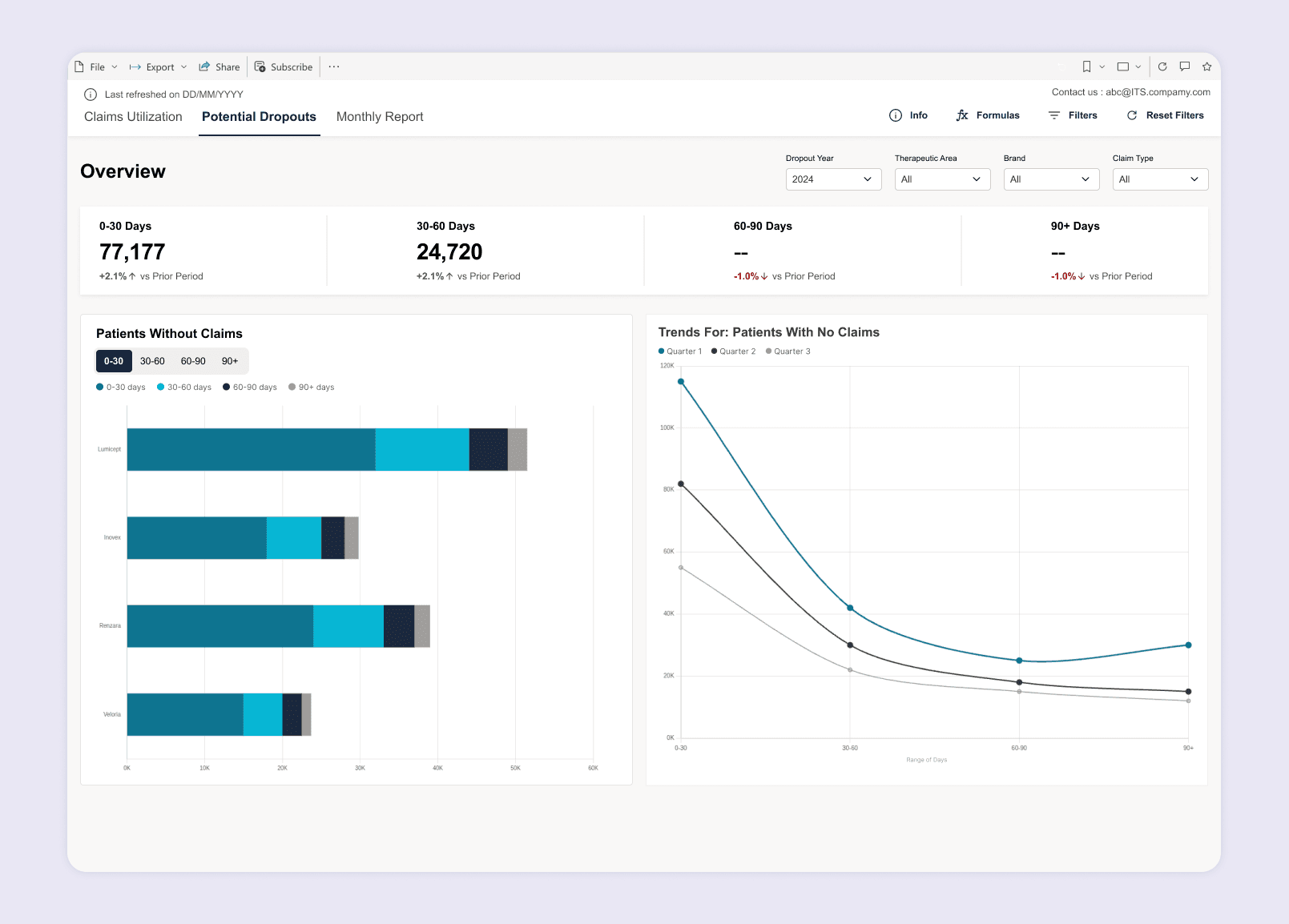
Research surfaced a critical blind spot: patients who enroll but never file a claim were invisible in existing reports. This dedicated retention module segments those patients into time-based risk buckets — 0-30, 30-60, 60-90, and 90+ days without claims. A horizontal stacked bar chart breaks down dropout distribution by brand, deliberately replacing the original treemap which broke at single-brand selection. Quarterly trend lines reveal whether intervention efforts are bending the dropout curve.
Tabular Deep Dive → Numbers At Glance
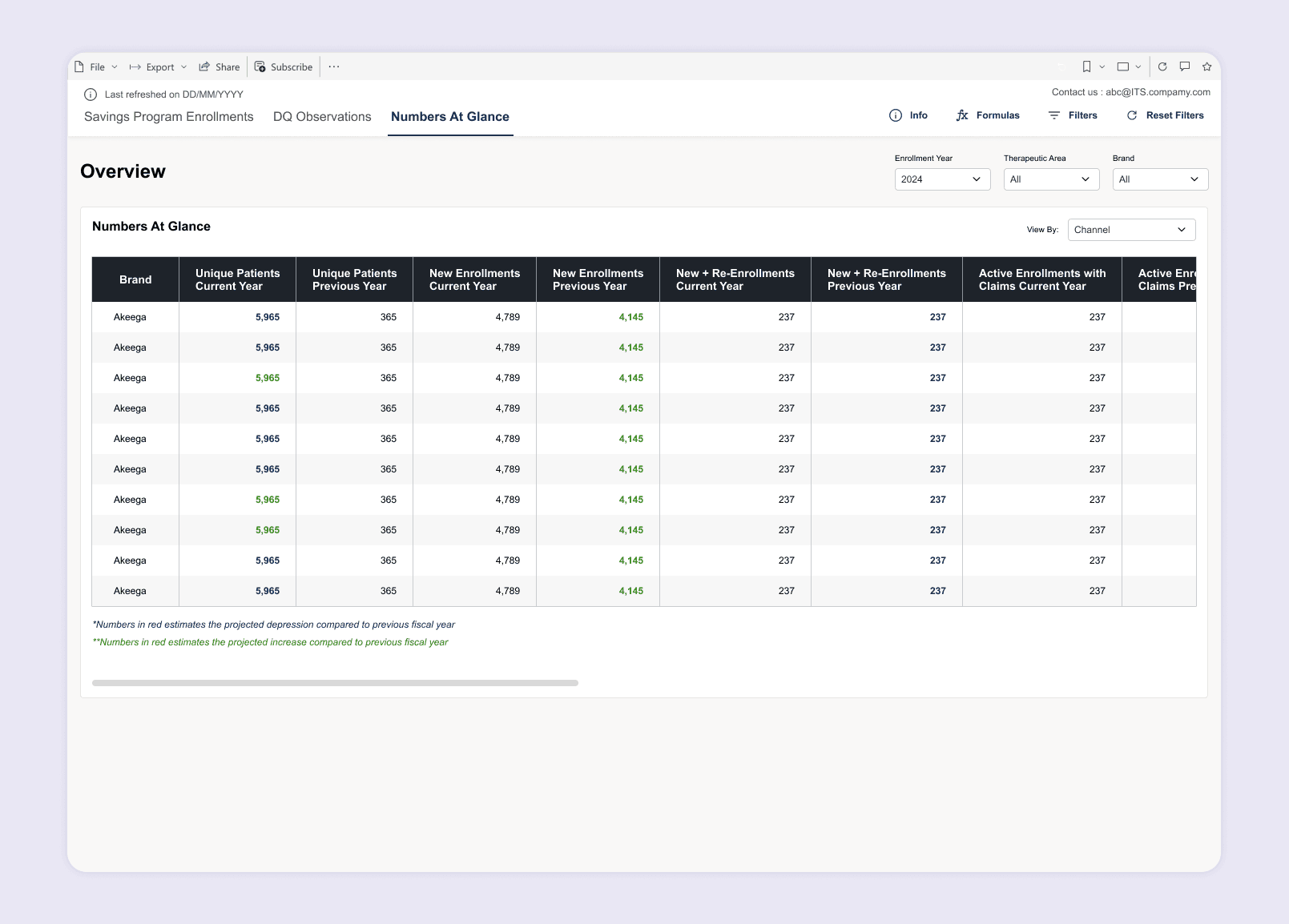
Not every user wants charts. This view serves power users and finance stakeholders who need exact figures. A dense data table presents enrollment metrics by brand with Current and Previous Year columns side by side. Color-coded cells highlight projected YoY changes — teal for movement, green for growth. The same "View By" toggle switches the table between Channel, Brand, and Therapeutic Area, giving raw data access without a separate export workflow.
Impact
Faster Decisions, Visible Patients
77,000+
At-Risk Patients Surfaced
The dropout detection module identified over 77,000
enrolled patients without claims in the 0-30 day window —
a population completely invisible in prior reporting, now
with a dedicated early-warning system.
~60%
Reduction in Reporting Turnaround
The question-driven IA and embedded AI summaries
collapsed a multi-day reporting cycle into a self-service
workflow where program managers answer stakeholder
questions in a single session.
Delivered in 6 weeks across five core views, the Patient Insights Dashboard replaced fragmented reporting with a single, question-driven analytics experience — giving patient services teams the visibility to optimize enrollments, monitor claims health, and intervene before patients fall off therapy.
This project has been white-labeled to protect client confidentiality. Brand names, data values, and visual identity have been modified. The design methodology and UX decisions shown are my original work.